The app
Daily challenges & XP
In short
In Zenith: Level Up in 21 Days, daily challenges are small real-life actions from your 21-day plan. Each one shows its time and XP. You do it in real life and mark it done yourself, and your saved XP, streak and character move. You can skip or undo. Stats shows completed and skipped challenges, best streak and an XP chart.
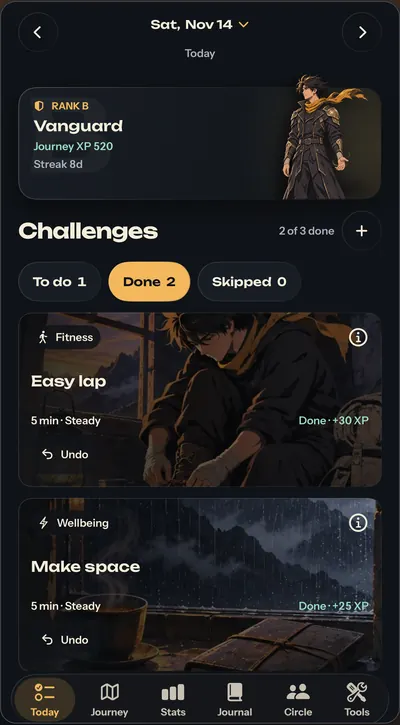
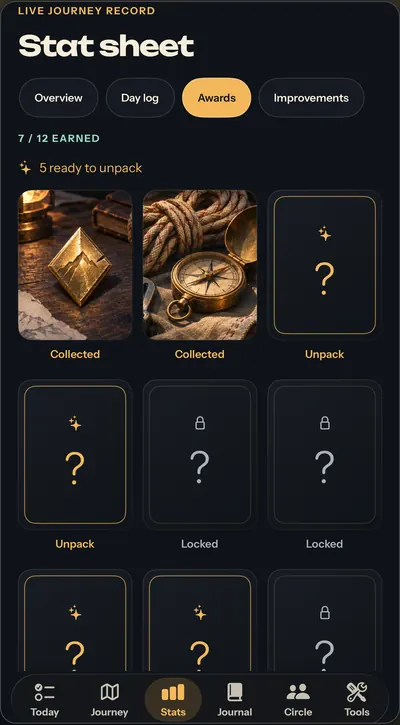


Demo values from the app. In Zenith you mark challenges done yourself.
Key takeaways
- A challenge is one real-life action with a clear time cost and XP value, for example "Easy lap · Fitness · 5 min · Steady · +30 XP".
- You mark challenges done yourself; Zenith doesn't track workouts, steps or sleep automatically.
- Earned XP sets your rank, from E Initiate at 0 XP to S Ascendant at 1,000 XP, and your character evolves with it.
- An optional private photo on a completed challenge earns +5 XP once, and it stays on your iPhone.
- Achievement cards are earned at activity milestones and revealed in the app, never bought.
On this page12 sections
What are daily challenges in Zenith?
Daily challenges are the small real-life actions that make up your 21-day plan in Zenith: Level Up in 21 Days. Each one tells you what to do, how long it takes and how much XP it's worth. You do it, then mark it done.
The idea is simple. "Get your life together" is too big to start. "Easy lap, 5 minutes" is not. A challenge turns a goal you keep putting off into one move you can make today.
What does Today show?
Today is where the day happens. At the top is your character card: your rank, your Journey XP and your streak. Below it is the day's list of challenges, split into To do, Done and Skipped, with a count like "2 of 3 done". An expandable calendar lets you jump to other dates.
Every challenge card shows the action, its category, the time and the XP before you start. A real example from the app reads "Easy lap · Fitness · 5 min · Steady · +30 XP".
Seeing the cost up front helps. You know a challenge takes five minutes, so you can't tell yourself you don't have time. You know what it's worth, so finishing it feels like something.
How do you complete a challenge?
You do it in real life, then mark it done yourself. Here's the loop:
- Open Today and read the challenge.
- Do it: the lap, the reading, the early night.
- Mark it done. Your XP, streak and character update.
- Come back tomorrow for the next step.
If a day goes sideways, you can skip a challenge or undo a tick. Nobody checks, because the honesty is yours to keep.
Why doesn't Zenith track challenges automatically?
Because the point is that you showed up, not that a sensor noticed. Zenith doesn't connect to Apple Health and doesn't track workouts, steps or sleep automatically. Workout and food logs are filled in by you.
The Journal and tools save what you put in them, but saving there doesn't complete a related challenge or award its XP. You still mark the challenge done in Today. That last tap is small, but it's a promise kept to yourself.
How does XP work?
XP is the score for effort. Every challenge you complete adds its XP to your saved Journey XP, and your rank comes from that total, not from days passing. The same original character changes form as you climb:
| Rank | Name | Journey XP |
|---|---|---|
| E | Initiate | 0 |
| D | Ember | 40 |
| C | Tempered | 180 |
| B | Vanguard | 420 |
| A | Luminary | 700 |
| S | Ascendant | 1,000 |
Setup Scan XP from onboarding is separate and doesn't count toward your rank. The full ladder and character forms are on the ranks page.
What do challenge photos do?
Photos are optional. If you save a photo to a completed challenge, you get +5 XP, once. The rules are simple:
- Replacing the photo doesn't add more XP.
- Removing the photo, or undoing the challenge, removes the bonus.
- You can only change photos on a day that's still editable.
- The photo stays on your iPhone and is left out of shared Circle scorecards.
A photo is a personal record of the moment. It isn't proof the activity happened, and nothing checks it with AI.

Text version
| Step | What | Detail |
|---|---|---|
| First | Mark the challenge done | The challenge's own XP joins your Journey XP. |
| +5 XP | Save a photo to it | Optional. The bonus is paid once per completed challenge. |
| +0 XP | Replace the photo | Swapping it doesn't stack another bonus. |
| Bonus removed | Remove the photo or undo | Removing the photo, or undoing the challenge, takes the +5 away. |
What's in Stats?
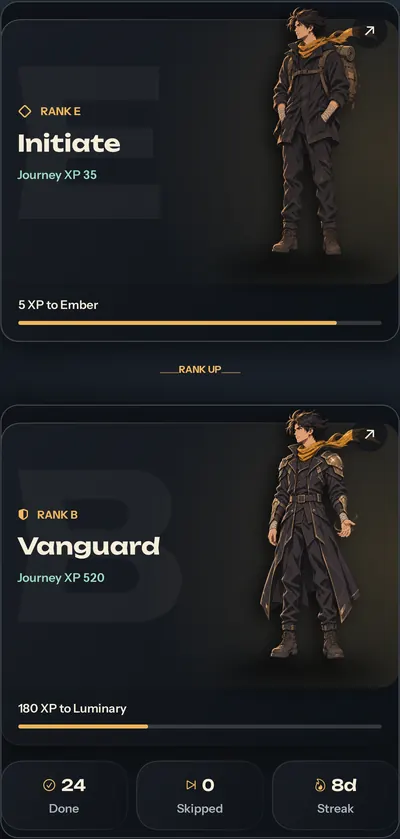
Tap the character card on Today and Stats opens. It shows the same character from the same saved XP, plus compact numbers: completed challenges, skipped challenges and best streak. A six-pillar radar chart shows the XP you've actually earned in each area, with exact values. It's a record of effort, not a diagnosis, a fitness test or a score of your real-world ability.
The stat sheet has four tabs: Overview, Day log, Awards and Improvements. From Stats you can also open the full path from Rank E to Rank S.
How do streaks work?
A streak shows how many days in a row you've kept showing up. Stats also keeps your best streak, so a broken streak doesn't erase the record of what you've already done.
Streaks work best as a nudge, not a judge. If you miss a day, the useful move is to come back the next day. Our guide on how to stay consistent covers how to recover a run without starting over in your head.
What are achievement cards and packs?
Achievement cards are rewards tied to activity milestones. In the Awards tab you browse illustrated packs and reveal the cards you've earned with a scratch or tap. There's an accessible way to reveal them too. Locked cards are rewards you haven't reached yet.
Cards are earned, never bought. They're not paid, not randomized purchases and not gambling.
Can you change your challenges?
Yes, week by week. Edit plan lets you change or delete challenges in the weeks ahead, set reminders and preview future days. Today and past records are protected.
So if a challenge doesn't fit your schedule, you don't have to quit the plan. Change it for next week and keep going. The 21-day plan page shows how the whole plan looks as a mountain.
Does gamifying habits actually help?
It can, when the game points at real behaviour, but the evidence is mixed. We look at what helps and what backfires in do gamified habit apps work, and at DIY versions in our life RPG guide.
Zenith keeps the game tied to real life: every point comes from something you did off-screen.
Try the format now
The free Side Quest Generator rolls a real-life side quest with a time and XP label, so you can feel the format today. Then pre-order Zenith on the App Store. Apple expects Nov 20, 2026.
Questions people ask
What is a challenge in Zenith?
A challenge is one small action from your 21-day plan that you do in real life, like a short walk, a focused study block or an early night. Each challenge shows the time it takes and the XP it's worth, so you know the cost before you start. You mark it done yourself.
How do you earn XP in Zenith?
You earn XP by completing challenges and marking them done. Every challenge shows its XP up front. A real example from the app: an easy lap, five minutes, worth 30 XP. Your saved Journey XP sets your rank, from E Initiate at 0 XP up to S Ascendant at 1,000 XP.
Do challenge photos give extra XP?
Yes, +5 XP once per completed challenge with a saved photo. Replacing the photo doesn't stack, and removing it or undoing the challenge removes the bonus. You can only change photos on a day that's still editable. The photo is a private record on your iPhone, not proof or AI verification, and it's left out of Circle scorecards.
What happens if I miss a challenge?
You can skip a challenge or undo a tick in Today. Skipped challenges show in Stats, a missed day can break your streak, and your best streak stays on record. With Edit plan you can also change the weeks ahead so the next days fit better.
Can Zenith tick challenges off automatically?
No. Zenith doesn't connect to Apple Health and doesn't track workouts, steps or sleep automatically. You do the challenge and mark it done yourself. Saving a journal entry or a tool log doesn't complete a related challenge or award its XP; you still tick it in Today.
Are achievement packs paid or random?
Neither. Achievement cards are tied to activity milestones and earned by doing your challenges. You browse illustrated packs and reveal earned cards with a scratch or tap, with an accessible alternative. They're not paid, not randomized purchases and not gambling. Locked cards are rewards you haven't reached yet.
Sources
- Level Up in 21 Days: Zenith (App Store listing)Apple App Store, 2026-11-14
- Zenith supportARKANAV ENTERPRISES PVT LTD, 2026
- Zenith privacy policyARKANAV ENTERPRISES PVT LTD, 2026-11-14