The app
Journal and tools inside Zenith
In short
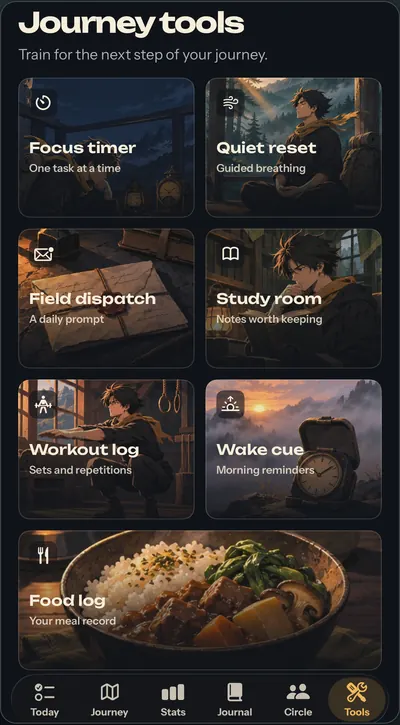
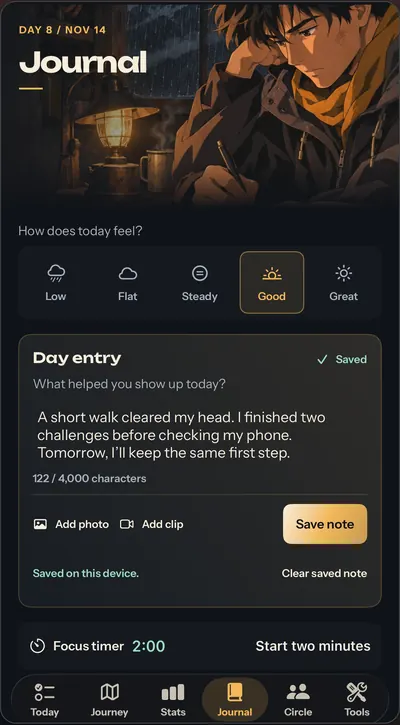
Zenith: Level Up in 21 Days includes a Journal (mood check-in, day notes, optional photo or clip) and seven Journey tools: Focus timer, Quiet reset, Field dispatch, Study room, Workout log, Wake cue and Food log. Everything saves on your iPhone. Saving in a tool doesn't complete a challenge for you, and nothing is tracked automatically.
Key takeaways
- The Journal holds a mood check-in from Low to Great, day entry notes and an optional photo or clip, saved on your iPhone.
- Journey tools are Focus timer, Quiet reset, Field dispatch, Study room, Workout log, Wake cue and Food log.
- Workout and food logs are filled in by you; Zenith doesn't connect to Apple Health or track anything automatically.
- Journal and tool saves don't complete related challenges or award challenge XP; you still mark challenges done in Today.
On this page6 sections
What tools are inside Zenith?
Zenith: Level Up in 21 Days includes a Journal and seven Journey tools: Focus timer, Quiet reset, Field dispatch, Study room, Workout log, Wake cue and Food log. They sit beside your daily challenges, so you don't need four other apps to do one plan.
Think of challenges as the what and tools as the how. The challenge says "one focused study block". The Focus timer helps you do it.
Journal
The Journal is where the day gets written down. It has three parts:
- Mood check-in. "How does today feel?" with five options: Low, Flat, Steady, Good and Great.
- Day entry. Notes on what helped you show up, or whatever you want to get out of your head.
- Optional photo or clip, if a picture says it better.
Entries are saved on your iPhone, and the history shows past days clearly. By the third week of the 21-day plan, your journal is part of the proof: challenges, streak and entries in one place.
The seven Journey tools
| Tool | What it's for |
|---|---|
| Focus timer | One task at a time |
| Quiet reset | Guided breathing for a short reset |
| Field dispatch | A daily prompt |
| Study room | Notes worth keeping |
| Workout log | Sets and repetitions, filled in by you |
| Wake cue | Morning reminders |
| Food log | Your meal record, filled in by you |
Focus timer and Quiet reset
Focus timer is built for one task at a time. Start it, do the work, stop when it ends. Quiet reset is guided breathing for when you need a pause before a hard task or after a long day. If procrastination is the thing you're fighting, our guide on how to stop procrastinating pairs well with a timed block.
Field dispatch and Study room
Field dispatch gives you a daily prompt. Study room holds notes worth keeping. Both are small ways to close the day with one thing you noticed or learned.
Workout log and Food log
Workout log records sets and repetitions. Food log is your meal record. You fill both in yourself. Zenith doesn't connect to Apple Health, doesn't track workouts, steps or sleep automatically, and doesn't estimate nutrition from photos.
That's a trade-off worth knowing. Manual logs take a few seconds more, but they keep you paying attention to what you did. If you want automatic tracking, use a separate fitness app alongside Zenith.
Wake cue
Wake cue sets morning reminders, which matters because mornings are where a lot of plans fall apart. A steady wake time is one of the simplest anchors for a routine. Our guide on how to wake up early covers the rest of the morning.
How do tools connect to your challenges?
Tools help; challenges are ticked by you. Saving a journal entry, a timer session or a log doesn't automatically complete a related challenge or award challenge XP. You still mark the challenge done in Today.

Text version
| Step | What | Detail |
|---|---|---|
| Today | The challenge sets the task | For example, one focused study block. |
| Tool | A tool helps you do it | Focus timer, Journal or a log. Saving here doesn't complete anything. |
| You | Mark it done in Today | The tick is always yours to make. |
| XP | Challenge XP is added | Only from a challenge you recorded yourself. |
That keeps one rule across the app: every XP point comes from a challenge you recorded yourself. More on that in daily challenges and XP.
The tools are part of the paid app, which starts after the free assessment and 21-day plan preview. Pricing has the details.
What Zenith's tools don't do
To be clear about the limits, Zenith's tools don't:
- Coach you with AI.
- Read data from Apple Health or track anything automatically.
- Estimate nutrition from food photos.
- Block apps or websites.
- Sync to the cloud or another device. Your records stay on your iPhone.
Free tools on this site
You can try some of the ideas today, no app needed. The free habit tracker template gives you a printable tracker with XP and levels, and the Starting Rank Test shows where your climb would begin. Then pre-order Zenith on the App Store. Apple expects Nov 20, 2026.
Questions people ask
What tools does Zenith have?
Zenith has a Journal (mood check-in, day notes, optional photo or clip) and seven Journey tools: Focus timer for one task at a time, Quiet reset for guided breathing, Field dispatch for a daily prompt, Study room for notes worth keeping, Workout log, Wake cue for morning reminders and Food log. They sit next to your daily challenges.
Does Zenith track my workouts or food automatically?
No. Workout log and Food log are filled in by you: sets and repetitions, and your meal record. Zenith doesn't connect to Apple Health and doesn't track workouts, steps or sleep automatically. It doesn't estimate nutrition from photos either. If you want automatic tracking, pair Zenith with a separate fitness app.
Do journal entries count as completing a challenge?
No. Journal and tool saves don't automatically complete related challenges or award challenge XP. You still mark the challenge done in Today. That keeps one simple rule across the app: you record your challenges yourself, and your XP, streak and character move when you do.
Can Zenith block distracting apps?
No. Zenith doesn't block apps or websites. It gives you a Focus timer for one task at a time and Quiet reset for a short breathing break, plus challenges that build better phone habits. If you need hard blocking, use iPhone's built-in Screen Time alongside it.
Where are my journal entries stored?
On your iPhone. The Journal shows "Saved on this device". There's no Zenith cloud backup or sync between devices. If paid access ends, records stay on the device but the main app locks until access is restored. Deleting the app removes its local records.
Sources
- Level Up in 21 Days: Zenith (App Store listing)Apple App Store, 2026-11-14
- Zenith supportARKANAV ENTERPRISES PVT LTD, 2026
- Zenith privacy policyARKANAV ENTERPRISES PVT LTD, 2026-11-14