The app
How Zenith works
In short
Zenith: Level Up in 21 Days works like this: you take a free assessment, preview a free personalized 21-day plan, then activate it. Each day you do real-life challenges and mark them done yourself. Your saved XP, streak and character move with every challenge, from Rank E Initiate toward Rank S Ascendant. You can edit the weeks ahead.
Take the assessmentFree
Your priorities, your routine, your real capacity.
Preview your 21-day planFree
Three weeks of challenges shaped around your life.
Activate the plan
Monthly, Yearly or Lifetime access.
Do today's challenges
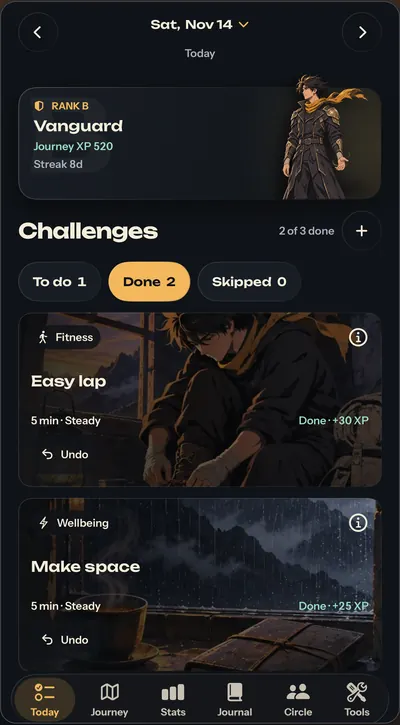
Each one shows its time and XP, like Easy lap · Fitness · 5 min · +30 XP.
Mark it done yourself
Skip or undo if you need to. Nothing is tracked for you.
Watch it add up
Your saved XP, streak and character move with every challenge.
Key takeaways
- The assessment and the 21-day plan preview are both free, so you see your plan and your character before you pay.
- The planner runs on your iPhone and follows fixed rules from your answers; it doesn't use AI.
- Every challenge shows its time and XP, and you mark it done yourself, with skip and undo if you need them.
- Earned XP moves your rank from E Initiate (0 XP) to S Ascendant (1,000 XP), and your character changes form as you climb.
- Zenith doesn't track anything automatically and doesn't connect to Apple Health: the work, and the tick, are yours.
On this page10 sections
How does Zenith work?
Zenith: Level Up in 21 Days turns your next three weeks into small, real-life challenges. You take a free assessment, see your free 21-day plan, activate it, then do one clear challenge at a time and mark it done yourself. The app keeps score: saved XP, your streak and a character that evolves as you earn.
That's the whole loop. No feed to scroll, no coach talking at you. You know what you want to fix. Zenith turns it into one move you can make today, then shows you it's adding up.

Text version
| Step | What | Detail |
|---|---|---|
| Free | Assessment + preview | See your 21-day plan and character before you pay. |
| Paid | Activate the plan | Monthly, Yearly or Lifetime. No trial. |
| Every day | Do it in real life | Each challenge shows its time and XP. |
| Every day | Mark it done | You tick it. Nothing is tracked for you. |
| Every day | XP and rank move | Your character evolves as XP adds up. |
Step 1: Take the free assessment
The assessment asks about your priorities and how much you can realistically take on. It's free.
Answer it honestly. If you have exams, a job, training or a long commute, say so. A plan that fits the life you actually lead beats a perfect plan you quit on day four.
The planner runs on your iPhone and follows fixed rules, so the same answers give the same plan. No AI is involved. Answering questions gives you Setup Scan XP, which is separate from the Journey XP you earn later.
Want a taste now? The Starting Rank Test on this site asks six quick questions and shows where you'd start on the E-to-S ladder. It isn't the in-app assessment, just a quick taste.
Step 2: Preview your plan and your character (free)
Next you see your personalized 21-day plan, shaped around your answers. Onboarding also previews your character and the 21-day climb, with artwork for each step. All of this comes before you pay, so you know what you'd be doing.
Step 3: Activate the plan
To start, choose Monthly ($12.99), Yearly ($59.99) or Lifetime ($69.99). These are U.S. prices in USD; Apple shows your local price. There's no free trial and no free Day 1. Details are on the pricing page.
Step 4: Do today's challenges
Open Today. At the top is your character card with your rank, Journey XP and streak. Below it are the day's challenges, sorted into To do, Done and Skipped, and an expandable calendar for other dates.
Every challenge shows its time and XP. A real example from the app: "Easy lap · Fitness · 5 min · Steady · +30 XP". Do it in real life, then mark it done. You can skip a challenge or undo a tick. The point is to come back tomorrow, not to be perfect. See how challenges and XP work for the detail.
Step 5: Watch it add up

Every challenge you finish adds to your saved Journey XP, and your rank comes from that XP, not from days passing. The same original character changes form as you climb:
| Rank | Name | Journey XP |
|---|---|---|
| E | Initiate | 0 |
| D | Ember | 40 |
| C | Tempered | 180 |
| B | Vanguard | 420 |
| A | Luminary | 700 |
| S | Ascendant | 1,000 |
Tap your character card to open Stats. You'll see completed challenges, skipped challenges, best streak and a six-pillar chart of the XP you've earned, with exact values. It's a record of effort, not a diagnosis or fitness test. Milestones earn achievement cards you reveal in the app, never bought. The full ladder is on the ranks page.
Can you change the plan once it starts?
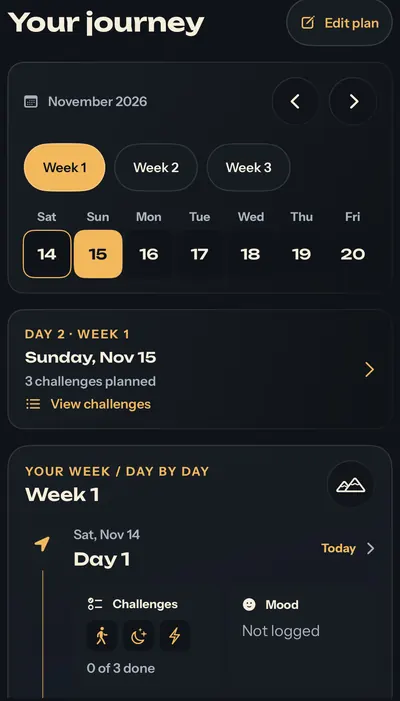
Yes. The Journey tab shows your plan as a 3D mountain, Day 1 at the base and Day 21 at the summit, or as a day-by-day timeline. Edit plan lets you change the weeks ahead: edit or delete challenges, set reminders and preview future days. Today and your past records are protected.
This matters more than it sounds. Three weeks is long enough for a deadline, a match or a bad night of sleep to land in the middle. Editing the weeks ahead lets the plan bend instead of break.
What you do vs what Zenith does
Zenith makes the next step clear and keeps the score. The doing is yours.
| You | Zenith |
|---|---|
| Answer the assessment honestly | Builds a 21-day plan from your answers, on your iPhone |
| Do the challenge in real life | Shows one clear challenge with its time and XP |
| Mark it done, skip it or undo it | Saves your XP, streak and character stage |
| Fill in workout and food logs | Keeps them on your iPhone |
| Edit the weeks ahead | Keeps today and past records protected |
| Share a signed scorecard with friends | Compares the weekly scorecards you import |
The Journal, Focus timer, Quiet reset and other tools sit in the same app. Saving a journal entry or a log doesn't complete a challenge for you; you still mark that yourself.
What Zenith doesn't do
Knowing the limits helps you decide. Zenith doesn't:
- Coach you with AI.
- Connect to Apple Health or track workouts, steps or sleep automatically.
- Block apps or websites.
- Run public rankings or a public feed.
- Sync between devices. Your records stay on your iPhone, with no Zenith cloud backup.
It runs on iPhone with iOS 18 or later, in English, and launches in the U.S., U.K., Canada, Australia and India.
How to start
Zenith is on App Store pre-order now, and Apple expects Nov 20, 2026. Pre-order it on the App Store, and find your starting rank with the free test while you wait. Prices and what's free are on the pricing page.
Questions people ask
How does Zenith work?
Take a short free assessment about your priorities and capacity. Preview your free personalized 21-day plan. Activate it with Monthly, Yearly or Lifetime access. Then each day open Today, do a challenge in real life and mark it done. Your saved XP, streak and character update with every challenge you finish.
Do I have to do every challenge every day?
No. You can skip or undo a challenge in Today. With Edit plan you can also change the weeks ahead: edit or delete challenges, set reminders and preview future days. Today and your past records are protected, so editing never rewrites what you've already done.
How does Zenith know I finished a challenge?
It doesn't check. You do the challenge in real life and mark it done yourself. Zenith doesn't track workouts, steps or sleep automatically and doesn't connect to Apple Health. An optional challenge photo is a private record, not proof or AI checking. The honesty stays with you.
What happens after the free plan preview?
Onboarding shows you your character and the 21-day climb ahead, then a paywall. Starting the plan needs Monthly ($12.99), Yearly ($59.99) or Lifetime ($69.99) access. These are U.S. prices in USD; Apple shows your local price. There's no free trial or free Day 1, and every option unlocks the same paid features.
Does Zenith use AI to coach me?
No. Zenith doesn't use AI to coach you. The planner runs locally on your iPhone and follows fixed rules, so the same answers give the same plan. You can edit the weeks ahead yourself. The app's job is to make the next step clear and show your effort adding up.
Sources
- Level Up in 21 Days: Zenith (App Store listing)Apple App Store, 2026-11-14
- Zenith supportARKANAV ENTERPRISES PVT LTD, 2026
- Zenith privacy policyARKANAV ENTERPRISES PVT LTD, 2026-11-14